Live Screen & Voice Translate › How to use ・ 日本語
Translate a foreign game on your iPhone while you play
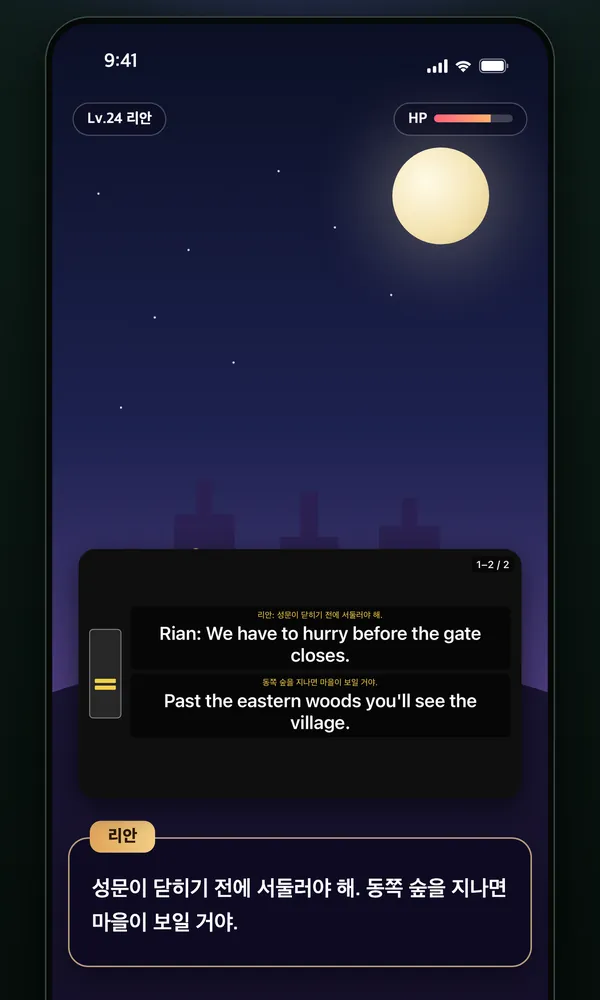
Start Live Translation in screen mode in the free iPhone app Live Screen & Voice Translate (Miruyaku), then switch back to your game: the app reads the dialogue and menu text on screen on the device and keeps the translation flowing in a floating Picture in Picture window.
You never leave the game, and it works on iOS 18 or later. For a scene you want to read closely, assign Translate Screenshot to Back Tap and the translation is laid over the original text in place.
Free to use (banner ads; optional monthly subscription removes ads). iPhone with iOS 18 or later (some features need iOS 26 or later).
Steps
Keep translating in a floating window (Live Translation, screen)
- On the Miruyaku home screen, under "What Live Translation translates", choose Screen.
- Tap Live Translation, then Start, and in the iOS menu choose Miruyaku and Start Broadcast.
- Switch to the game and move the window over the dialogue you want translated. Translation starts from the text just below the window.
Translate just the current screen (Translate Screenshot)
- In Miruyaku's Settings, open How to Use & Shortcut Setup and add the Translate Screenshot shortcut.
- In iOS Settings, go to Accessibility → Touch → Back Tap and assign the shortcut.
- While playing, tap the back of your iPhone twice and the translation appears over the text on that screen.
Good for / tips
- The start of the original is shown in yellow above each translation, so you can tell which line it belongs to.
- Only newly visible lines are translated as the screen changes or scrolls, so the same line isn't translated again and again.
- Show 1–5 lines at once (3 by default). ⏸ pauses, and ◁ ▷ step to the previous or next lines.
- Good for playing foreign games that don't support your language.
- To translate voiced lines instead, set "What Live Translation translates" to Audio (iOS 26 or later).
- When you stop Live Translation, the translated text is kept in History (up to 3,000 lines), where you can search it later.
What it can't do / requirements
- Text can be read in 48 languages. Indian scripts such as Hindi, and Greek, Hebrew, Persian, Urdu and Georgian scripts can't be read (they can still be chosen as the target language).
- Screen reading needs iOS 18 or later; Live Translation of audio needs iOS 26 or later.
- Apps that block audio capture may not provide sound.
- Back Tap works on iPhones that support it.
FAQ
Is there an iPhone app that translates a game while I play?
Yes — Live Screen & Voice Translate (Miruyaku). Start Live Translation in screen mode and go back to the game: translations of the dialogue and menus keep flowing in a floating window, so you can read without stopping the game, and ⏸ pauses it. For a scene you want to read closely, assign the Translate Screenshot shortcut to Back Tap and the translation is laid over speech bubbles and choices in place. It works on iOS 18 or later and is free.
Is my game screen recorded or sent anywhere?
Text is read on the iPhone, and the screen image is not sent anywhere. The app receives the screen through screen broadcast, but nothing is recorded or saved. Standard translation also runs only on the device (the developer has no servers).
Does it cost anything?
It's free. Every translation feature is available with no limit on the number of translations or minutes. A banner ad is shown at the bottom; full-screen ads appear only at breaks between translations, never during Live Translation. An optional subscription removes the ads (features are the same).
More details
Other situations
- Translate manga and webtoons on your iPhoneScreenshots get translations in the bubbles; scrolling gets a floating window
- Watch foreign videos and live streams with translated subtitlesTranslated subtitles on videos and live streams as people speak
- Translate menus and signs with your iPhone camera while travelingPoint the camera and the translation sits over each line
- Talk face to face with someone who speaks another language, using one iPhoneFace-to-face translation where the other person never presses a button
- Translate an iPhone screenshot with the text kept in placeTranslations drawn where the text was, or the current screen with a back tap
- Add translated subtitles to a video on your iPhone and save itSubtitle a video from Photos or Files and save it with them burned in