Live Screen & Voice Translate › How to use ・ 日本語
Talk face to face with someone who speaks another language, using one iPhone
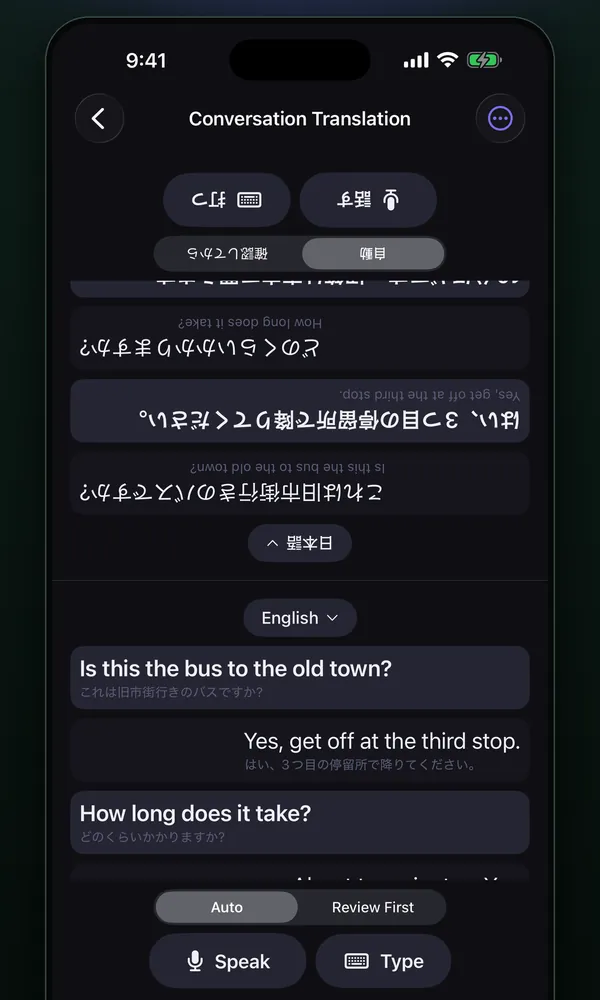
In the free iPhone app Live Screen & Voice Translate (Miruyaku), open Conversation Translation, choose Back-and-Forth and place one iPhone between the two of you. The other person's words are heard and translated continuously with no button to press, so they can talk at their normal pace.
You tap Speak only on your turn; when you finish, it is sent automatically, shown large on their side and read aloud in their language. Their half of the screen is upside down so they can read it from across the table. It needs iOS 26 or later.
Free to use (banner ads; optional monthly subscription removes ads). iPhone with iOS 18 or later (some features need iOS 26 or later).
Steps
Talking with Back-and-Forth
- Open Conversation Translation on the Miruyaku home screen, choose Back-and-Forth as the way of talking, and set the other person's language and yours.
- Place the iPhone between you. The screen is split top and bottom, and the other person's half (the top) is shown upside down so they can read it.
- Tap Start and the app begins listening to the other person. They simply talk, and the translation appears on your side.
- To reply, tap Speak and talk. When you finish (after 1.2 seconds of silence), it is sent automatically, and the translation is shown and read aloud on their side. Then the app goes back to listening to them.
Good for / tips
- The language is set by role — their side is their language, your side is yours — so the app doesn't have to guess, and mix-ups are less likely.
- A button marks the start of your turn, so pausing to think or a quick "uh-huh" from the other person is less likely to cut the conversation in the wrong place.
- You can also choose Auto (both sides have Speak; a line is finished after 1.5 seconds of silence) or Review First (fix it before sending).
- Use Type to send typed text. Long-press a line to copy the original and the translation.
- Good for short exchanges at shops and hotels while traveling, or receiving visitors from abroad. You can check what was said later in History.
- In landscape or on short screens, the conversation and the controls sit side by side.
What it can't do / requirements
- Requires iOS 26 or later. Speech is recognized on the device, and speech data (up to about 200 MB) may be needed the first time.
- Conversation Translation offers the 23 languages supported by Apple's translation. Speech recognition in Conversation Translation works in 10 languages: Japanese, English, Korean, Chinese (Simplified and Traditional), French, German, Spanish, Italian and Portuguese.
- In Back-and-Forth, only the translation of your own words is read aloud; the other person's words are shown on screen only. There are no voice or speaking-speed settings.
- Back-and-Forth pauses after 5 minutes without speech, when you leave the app, or when earphones are plugged in or out.
FAQ
Is there an app that interprets when I talk face to face with someone who speaks another language?
Conversation Translation in Live Screen & Voice Translate (Miruyaku) translates what each person says into the other's language and reads it aloud, with the iPhone placed between you. Of its three ways of talking, Back-and-Forth (the default at first) hears and translates the other person continuously with no button, while you tap a button when you speak and it sends when you finish. The other person's side is shown upside down so they can read it directly. It needs iOS 26 or later.
How is Back-and-Forth different from typical conversation translators?
Typical conversation translators either have whoever speaks press a button every time, or have neither person press anything while the app works out the language and when someone has finished. Back-and-Forth splits the roles: the other person's side listens without a button and your side speaks when you press. The language is set by role, so the app doesn't have to guess it, and your turn is set by the button, so hesitations and quick replies are less likely to split the conversation in the wrong place.
Does it work offline?
Speech recognition runs on the device, and standard translation also runs on the iPhone. With the language data downloaded in advance, it works where there's no connection.
More details
Other situations
- Translate a foreign game on your iPhone while you playRead game dialogue and menus in a floating window as you play
- Translate manga and webtoons on your iPhoneScreenshots get translations in the bubbles; scrolling gets a floating window
- Watch foreign videos and live streams with translated subtitlesTranslated subtitles on videos and live streams as people speak
- Translate menus and signs with your iPhone camera while travelingPoint the camera and the translation sits over each line
- Translate an iPhone screenshot with the text kept in placeTranslations drawn where the text was, or the current screen with a back tap
- Add translated subtitles to a video on your iPhone and save itSubtitle a video from Photos or Files and save it with them burned in